Customers compare before they buy. If you don't control that comparison, competitors will. A well-designed comparison section frames the decision in your favor.
Owning the Comparison
When customers research products, they create mental comparison charts. They look at features, prices, reviews, and policies across options. This comparison happens whether you participate or not.
By providing your own comparison, you control which factors get weighted. You choose the criteria that favor your strengths. You frame competitors in the context you prefer.
This isn't manipulation—it's helping customers evaluate options through a lens that matters. Just ensure your comparisons are accurate and fair.
Section Features
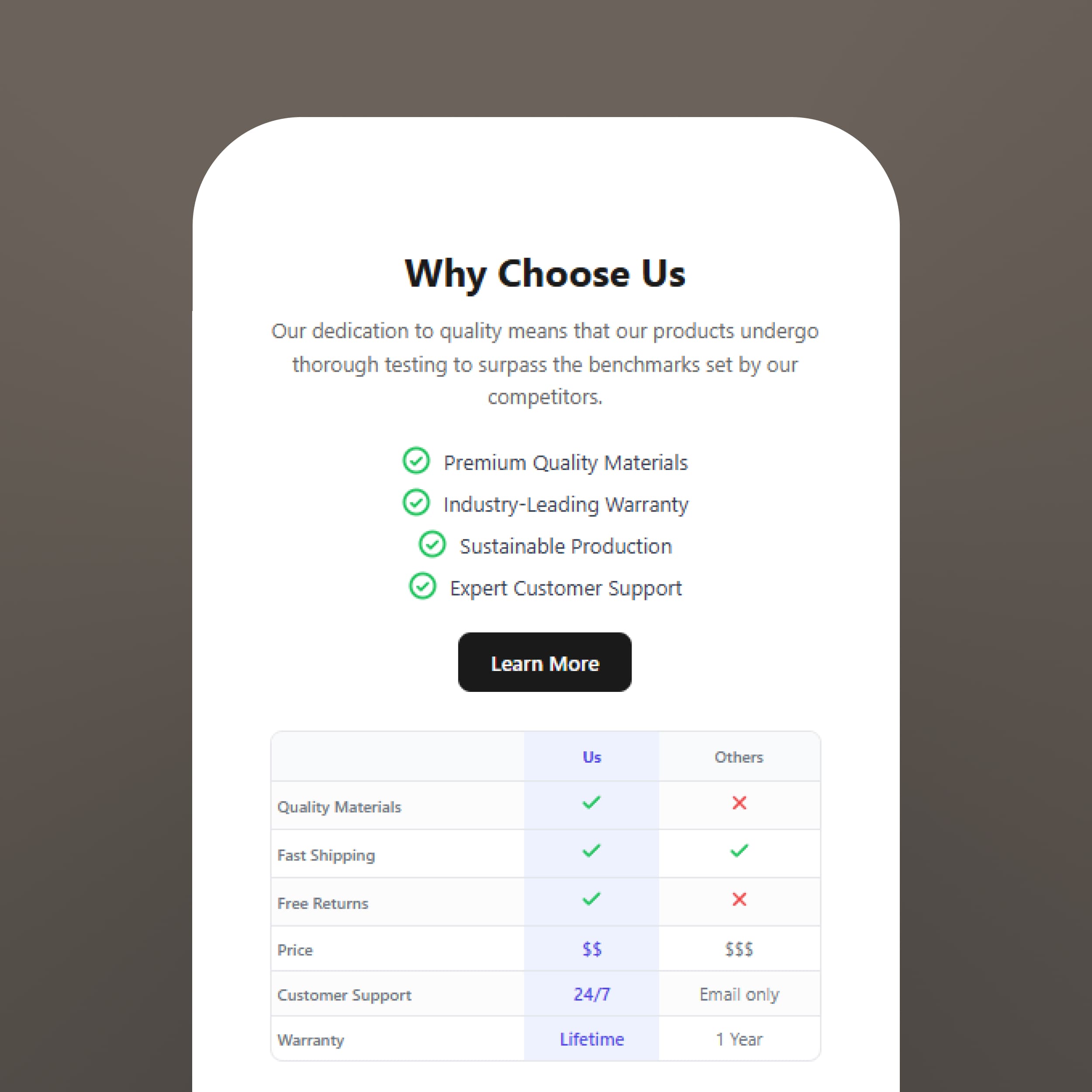
The Comparison section provides professional comparison tools.
• 4 style variants - Tables, cards, or visual formats
• Dynamic table rows - Add any comparison criteria
• Benefits list - Highlight key advantages
• Gradient backgrounds - Create visual distinction
The section makes complex comparisons scannable and persuasive.
Comparison Strategy
Effective comparisons require strategic thinking:
Choose criteria wisely: Compare on factors where you win
Be honest: Acknowledge areas where competitors are strong (credibility matters)
Name competitors carefully: Sometimes 'other brands' works better than specific names
Update regularly: Competitor offerings change—keep comparisons current
The goal isn't to trash competitors; it's to help customers understand why you're the better choice for their specific needs.
Fazit
Don't let customers make comparisons without your input. The Comparison section helps you frame the decision and win more sales.